You can pull the live map pack automatically. Enter your main service, add your city (or tap Use my location to detect it), and the tool fetches the real businesses ranking for that search and scans their names instantly. Prefer to work from a list? Paste names manually instead.
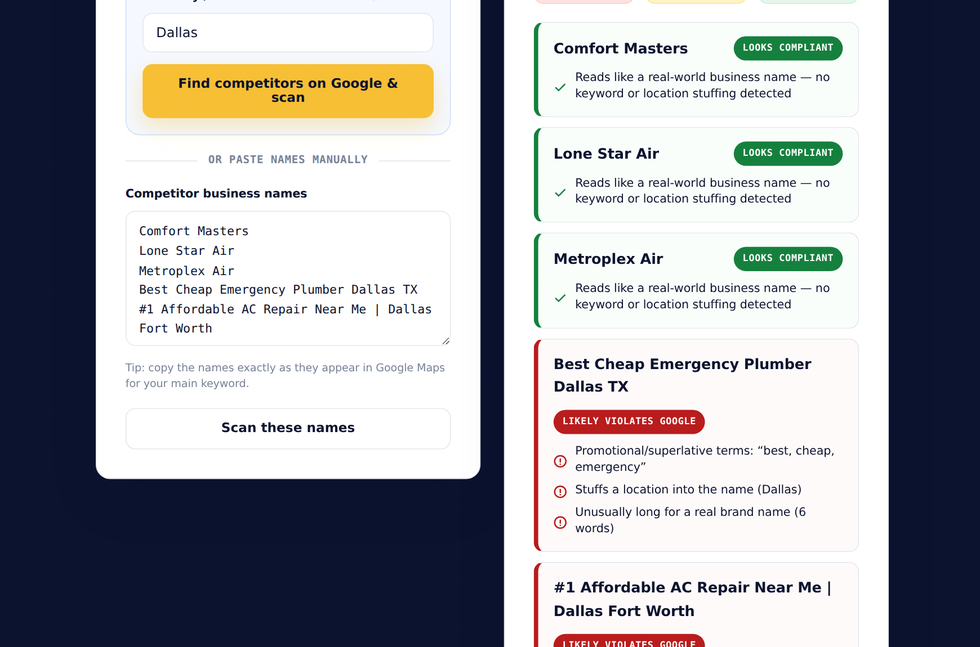
How to use it, step by step
- Enter your main service / keyword (e.g. “plumber”).
- Type your city and pick a suggestion, or tap Use my location to auto-detect it.
- Click Find competitors on Google & scan - the live map pack loads and is scanned automatically.
- Review each result: Likely violates Google, Suspicious, or Looks compliant, with the exact reasons.
- Use the redressal form link to report genuine violations.
How a name gets flagged
The scan looks for the patterns Google’s guidelines prohibit: promotional or superlative words (“best,” “cheap,” “#1,” “emergency”), a city stuffed into the name, multiple service keywords jammed together, separators like “|” or “–,” and unusually long names. A single service word is fine - “Mike’s Plumbing” is a real name - so the tool only flags genuine stuffing, not honest brands.
What to do with a violation
A flag is a heuristic, not a verdict - only Google decides. But if a competitor’s name clearly stuffs keywords, you can report it through Google’s Business Redressal Complaint Form, or via “Suggest an edit” on the listing. Reporting several at once with screenshots tends to get faster action, because Google responds to patterns.
Scan your map pack now
It is free, pulls live Google data, and needs no signup. Find the spam, then book a free call and we will help you win the right way.
Open the Map Spam Detector → Book a free call →